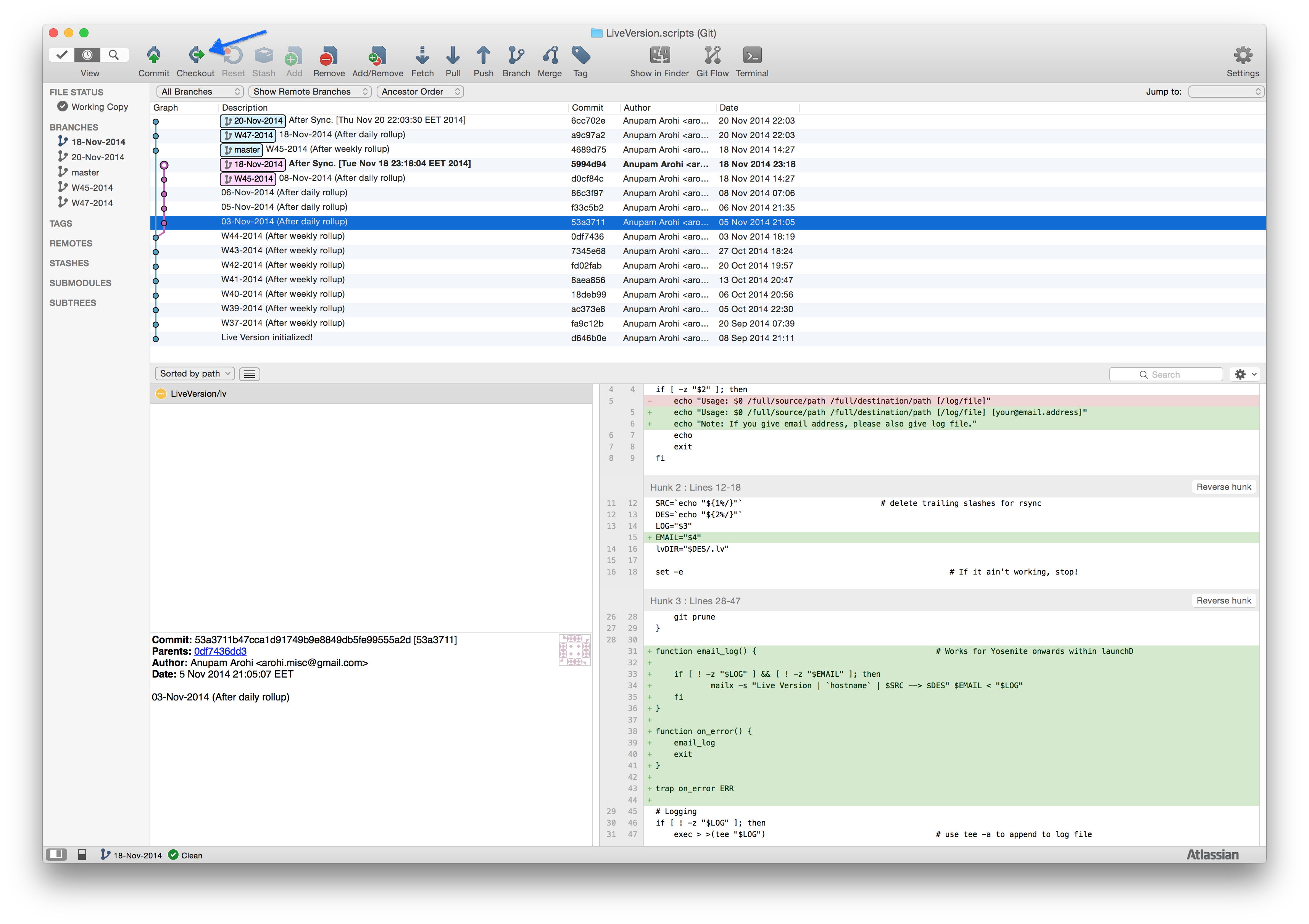
How do you I recover my work after a glitch or a goof-up? I’ll explain that here with an example:
On November 3rd, 2014. I had an impression that Apple fixed working of mailx within launch agents. So, I wrote additional code to support emailing logs via Live Version. Later when I tested, I realized its not really fixed. In frustration, I threw away the functionality.
After a while, I thought, well, Apple may support it or not, LV can still support it so people using LV via make files or other build scripts can leverage the functionality. Normally, I had to write that feature all over again! Since I track Live Version using Live Version, I receovered the feature. This is how:
- Went to 3-Nov-2014 end of the day commit in Live Repository of LV.
- Checked out that commit (53a3711)).
- Copied lv from live repository to a temp location.
- Tested lv against all test cases.
- Copied lv to the original location.
- Voila!
Simplest way to recover your work is to look at it in Live Repository using a graphical git client, like source tree. There you can easily see the changes between commits. At times, you’ll just need to see the change and nothing else.
If you feel lost and it’s challenging to find the commit you’re looking for, try git log -p -SWord from command line.
For example, in this case described above, I’ll execute git log -p -SEmail.